
Writing · 31 January 2012
The server side of game development
Every hosting option I tried between 2005 and 2012, from a server standing on toilet paper rolls in the attic to a CDN bill of 1,500 euros a month.
Are you running your own websites or multiplayer games? Then you know that hosting and scaling can be quite a puzzle. Making the wrong choices when you start development leads to server capacity problems fast. We’ve tried nearly every hosting option there is, so it was about time to share what happened.
Improvisation
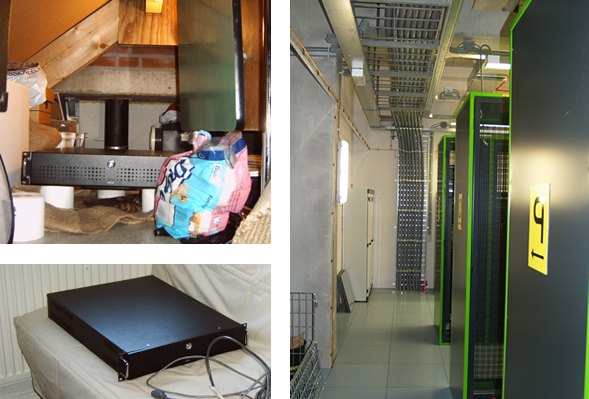
Our first “professional” server. It ran on 5 rolls of toilet paper in the attic before it moved to a real data center.
I started developing games in 2005. Back then I ran a few simple websites and browser based games, most notably Syrnia and SlaveHack. I ran these games on an ordinary desktop PC in the attic of the house. Later that “server” was replaced by a real server, still in the attic. As you can see in the pictures, I used toilet paper to damp the noise from the server’s resonance. I also put a smoke detector on top of it, just to be sure.
You have to start somewhere.
Obviously this wasn’t going to scale. The internet connection from home was decent, 10Mbit or so, but a few short circuits in the house, a server crash while I was on holiday and the general possibility of fire were getting on my nerves. That’s when I got the chance to co-locate the server in a rack in Amsterdam.
Co-location
Co-location was a big improvement. Remote management was scary at first but worked great, especially thanks to remote reboot and the occasional on-site help when the server wouldn’t come back online.
Renting dedicated servers
The next step was realising that owning and managing my own hardware was just silly. My core business is games, not server management. I moved to Leaseweb and rented two dedicated servers instead. Finally I didn’t have to replace failing hardware in person. When something broke, I emailed and waited. That is far better than carrying all of the responsibility yourself.
Cloud hosting and a content delivery network
The last chapter of our server adventure was quite a ride.
First we moved our dedicated machines to Leaseweb’s cloud hosting (VPS). The reason was that I didn’t want to keep reinstalling our servers every year. I moved server annually to keep up with price and hardware changes, and with cloud hosting the specs upgrade automatically. Moving a virtual server to a better or cheaper physical machine is easy, because the whole installation can simply be copied.
Wooglie started growing exponentially during 2011. At times all of our websites were offline because of the traffic Wooglie demanded. We had already upgraded our main server several times, so we started looking at hosting for our game files specifically.
Amazon CloudFront seemed like the logical start: endless scaling, extremely easy to set up. But our hosting bill went from 200 to about 1,500 euros a month. We were serving three times more traffic because we could finally cope with demand, and on top of that the traffic itself was about twice as expensive. CloudFront charges different prices per region: South America costs twice as much as the cheapest USA region, $0.25 per GB instead of $0.12. We didn’t need the regions CloudFront supports, so we moved Wooglie’s file hosting to Amazon S3 and served from the USA only. That halved the bill.
Even so, S3 was taking a big bite out of Wooglie’s advertising revenue. I have over 20 domains and my main servers at Leaseweb, and I like having everything registered with one party. When I asked whether they had plans for a CDN, their support suggested a single dedicated volume server based in the USA. That cut our costs from over $1,200 to less than $150 a month for Wooglie’s file hosting.
Fun fact: at roughly eight times lower cost, the cheaper option included ten times more bandwidth, 100TB a month. Lesson learned? Don’t pay for a CDN’s luxury when you don’t need it.
What I would build today
To pull the lessons together, here’s a server setup for a multiplayer game. I’ll use Cubelands as the example, because it isn’t really different from a multiplayer FPS or even a simple MMORPG. Four parts:
- The website
- Hosting the game downloads, standalone and web player
- The game database: players, friend lists and so on
- The game servers, for example Photon
Cubelands had 300,000 registered players just before it was sold. Let’s design for about 1,000 concurrent users. If I had to set up a game like it from scratch, this would be my target configuration for a first launch.
Website. One good VPS. 4GB memory, 2GHz, 4 cores. Around 50 euros a month.
Game database. Easy enough to run on the same VPS as the website, as long as it has the headroom. Move it to a dedicated database server when you actually need to. Zero euros a month.
Hosting the game downloads. A dedicated traffic or volume server is by far the most cost effective, easily ten times cheaper than a CDN. If you’re worried about scaling and have money to burn, move to one of the cheaper Amazon S3 regions for a fixed bandwidth fee. If you have even more money left, or download speed really matters to you, CloudFront is an amazing but expensive option. For this example I’d take a 100TB USA based server, or an unmetered 100Mbps one. Around 150 euros a month.
Game servers. What attracts me as an indie developer is Exit Games’ new cloud hosting service. It removes the need to manage servers entirely and scales extremely well. It’s even cheaper than self hosting, because you pay for exactly what you use. Watch out though: Amazon’s cloud servers are great for HTTP traffic but have high latency on UDP, which makes them a poor host for game servers like Photon. A Photon cloud server for 1,000 concurrent users is around 128 euros a month.
That’s about 328 euros a month in total, and for that you can comfortably run a thousand concurrent players.
Everything we tried, in short
A server in your own attic. Fire, crashes, a bad internet connection, and you have to move the thing when you run out of toilet paper.
Co-location. Managing hardware isn’t our business.
Amazon CloudFront. Astonishingly easy to configure and very fast, with no worries about scaling or downtime. Also quite expensive, especially in regions like South America.
Amazon S3. Easy to configure, no worries about scaling or downtime, cheaper than CloudFront. Still a touch expensive at $0.12 per GB in the cheapest region.
Dedicated servers. Great for file hosting because bandwidth is cheap. I don’t enjoy reinstalling one for every hardware upgrade.
VPS servers. Easy to upgrade when hardware or prices change, which gives you a degree of scaling. There is a ceiling to it, but we’re spoiled by services like CloudFront.
Photon Cloud for game servers. Cost effective, scales, no servers to worry about. Server side scripting isn’t possible on the cloud yet.

Who wrote this
I’m Mike Hergaarden. I’ve been building multiplayer games since 2004, co-created Photon Unity Networking with Exit Games, and shipped Crash Drive 3 across twelve platforms with everyone playing in one world. Performance is the part of the job I like most.